

Shopping Guide
1. Add the items you want to purchase to your shopping cart.
Click the " Add to Cart " button.
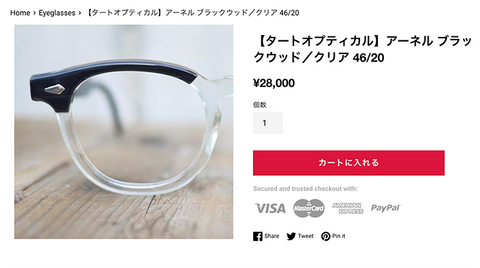
2. When an item is added to your shopping cart,
You will automatically be taken to the shopping cart screen.
If you wish to proceed with the purchase, click the " Checkout " button.
If you want to continue shopping, click " Continue Shopping ".
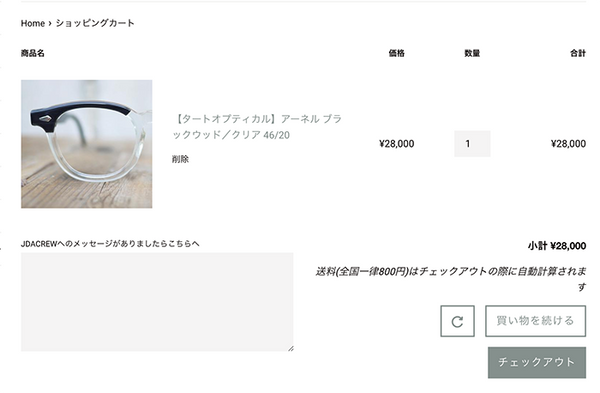
3. Proceed to the checkout screen.
If you have a JDA Store account, click " Login "
Click here and enter your email address and password on the login screen.
If you do not have an account, please enter your email address in the email field.
If you wish to pay by PayPal and already have a PayPal account,
Click the PAYPAL button to proceed to PAYPAL payment.
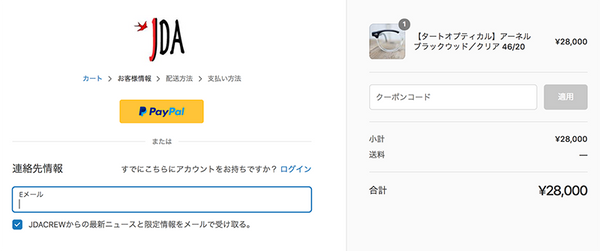
4. Fill in your customer information.
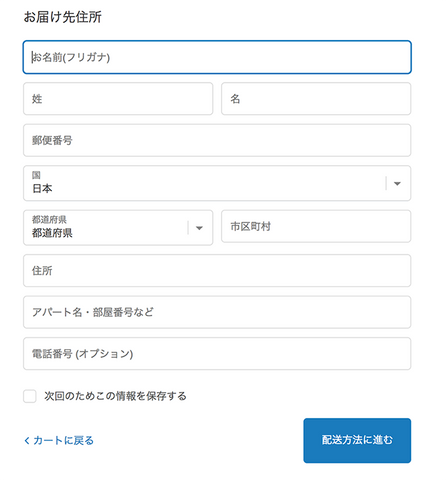
Please enter your shipping address.
If you have registered your address with your JDA account, your address will be automatically entered, so please confirm your address.
When entering an address, first enter the postal code and the address will be automatically filled in.
Once you have filled out and confirmed the information, click on Proceed to Shipping Method .
5. Confirm delivery method.
Shipping costs at the JDA Store are a flat rate of 800 yen nationwide.
No matter how many items you purchase, each order costs only 800 yen.
We only ship by regular mail, so if you would like to use a different shipping method, please contact us.
Confirm your contact email address and shipping address, then click Proceed to payment method .
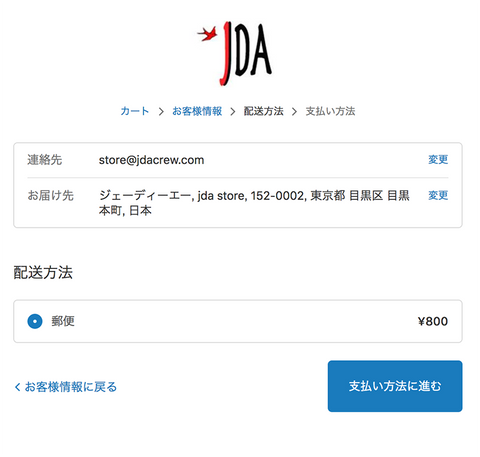
If you have a coupon code, enter it in the coupon code field and apply it (if ordering by smartphone, click " → " ) in the toolbar.
6. You will be taken to the payment screen.
If you wish to pay by credit card,
Check the credit card box and enter your card information.
We accept Visa, Mastercard, and American Express credit cards.
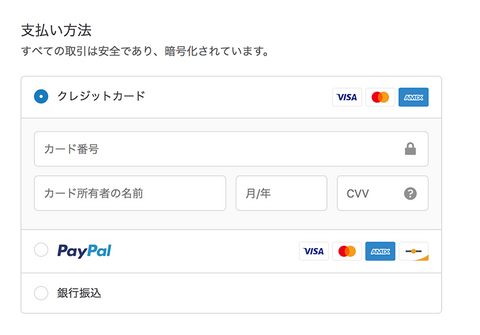
If you wish to pay by credit card, JCB or DINERS CLUB, you can pay through PAYPAL.
→ Check the PAYPAL section.
If you wish to pay by bank transfer, please check the bank transfer box.
The bank account number for the transfer (Sumitomo Mitsui Banking Corporation) will be displayed.
Please confirm the payment amount and account information and transfer the payment within 4 days.
7. Enter the orderer's address.
If the shipping address is the same as the orderer's address, check Same as shipping address .
→Click the order completion button
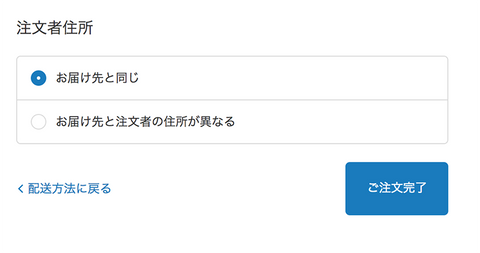
If the shipping address and the orderer's address are different, please check this box and enter the orderer's address.
Note: If you pay by credit card, the order address must match the address registered on your credit card.
Your credit card payment may be declined.
8. Press the order completion button.
If you pay by credit card or bank transfer, your order will be completed here.
An order receipt email will be sent to your registered email address.
Please check.
If you pay via PayPal, you will be automatically redirected to the PayPal screen.
If you are paying by bank transfer, open the email (subject: "Order #1xxx accepted") that was sent to you when you placed your order and click the confirmation button to confirm your payment amount and bank transfer information .
Please note that the payment deadline is 4 days, and if this deadline is exceeded, your order may be automatically canceled.
9. The product will be shipped.
We will send you a shipping completion email after shipping.
From there you can check the shipping status and order status.
If you have a JDA account, please log in.
You can check the status of your order on the MY ACCOUNT page.
Shipping will be via international mail (express mail) from our store in California, USA.
Please allow approximately 7 days for delivery.
*Regarding customs duties on products purchased within Japan
Please bear the cost yourself.
*If there is an initial defect, incorrect size, or other defect due to our negligence, we will handle it by cash on delivery.
If you have any other questions or concerns,
Please feel free to contact us at store@jdacrew.com.